Deckard guide
Task board
Run Deckard: Open Task Board, or select the board icon in the title bar of Related Notes or of the Tasks view, to see tasks as a Kanban board. Drag a card to another column to change the task in its note, or choose a column from the card’s ⋯ menu — the card moves at once, and the board says so if the note could not be written — which checks the task’s current status, priority, and due date, shows each choice’s key, and also works from the keyboard. The menu’s Note group has Move to…, which moves the task and its steps under another heading. A card whose task has steps carries a line under its details, 2 of 5 steps · next: Draft the email, and its plain steps have no cards of their own. The View options gear in the page’s corner switches between the board and a list, and edits the status columns. Parked tasks are left off the board unless its search says is:parked; Refine’s Parked value, with how many were left out, adds it.
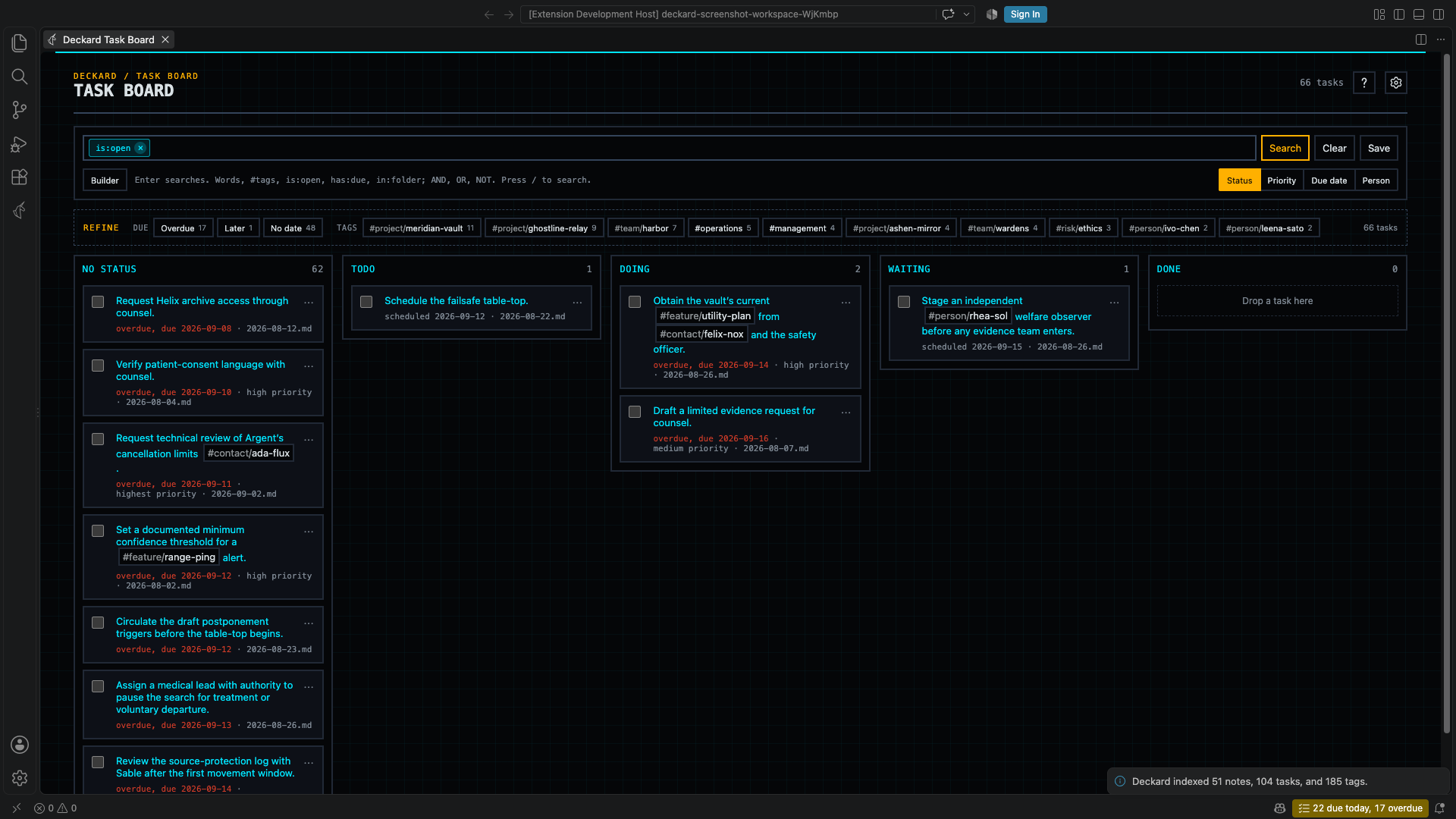
- Status gives each status tag written on a task line its own column, such as
#status/doing.deckard.board.statusessets the first columns and their order,todo,doing, andwaitingby default; any other status found on a task gets a column after them, and tasks without one wait in No status. Dropping a card replaces its status tag, or removes it in No status. While fewer than a quarter of the open tasks carry a status, a line above the columns says how many have none, how to give a task one, and offers Group by due date, which works for any task. Setdeckard.board.statusNamespaceto use another namespace, such as#stage/…. - Priority gives each priority a column. Dropping a card writes the new priority in the task’s own format, such as ⏫ or
[priority:: high]. - Due date has columns for Needs a new date, first and titled in red, for tasks more than 30 days overdue, then Overdue, Today, Tomorrow, Within a week, Later, and No due date. Drop a card on Today or Tomorrow to set its due date, or on No due date to remove it; the other columns cover a range of days, so they do not accept drops. A due date written in the task’s sentence, such as
by Sep 16, is left for you to edit. - Tag… groups by the tags of one namespace, chosen from a menu of the namespaces your open tasks carry, including tags inherited from headings and front matter:
#context/computerand#context/phoneeach get a column, in alphabetical order so the columns hold still as tasks move, then No context. A task with two such tags is a card in each column, which says also in the other. Dropping a card writes the new tag on the task line in place of the one it came from, or removes the task’s own tags in No context; a tag inherited from a heading or front matter stays, and Deckard says so. See Contexts, areas, and projects. - A due date is written by its distance from today with the date beside it — Overdue 15 days · 2026-09-08, Due tomorrow · 2026-09-24 — on a board card, in the list and table, on Home and search pages, and in query blocks, so nothing has to be subtracted, and an overdue task says so in words rather than in color alone. Beyond a month either way only the date is written, and a done task keeps its date as written. A task more than
deckard.tasks.needsNewDateAfterDays(30) days overdue reads was due 2026-07-01, in muted text rather than red, wherever it is listed: the calendar keeps its count but drops the warning color and says the tasks need a new date. - Every grouping ends with Done. Dropping a card there completes it, with its done date and next occurrence, and dragging it back out reopens it. Done shows the 20 most recently completed tasks.
- Search the tasks with the same search box as search pages, such as
#project/atlas,priority >= high, or plain words. Refine counts only tasks, and a search you run is added to your recent searches. The board opens onis:open, since a board is for what is still to do; clear the box for every task, or searchis:donefor the finished ones. - Each column’s header counts its cards, and how many of them are overdue: 40 · 38 overdue. When more than half a column is overdue, only the worst third — the longest overdue — keep the red; the rest say overdue in muted text beside a small red dot.
deckard.board.limitssets work-in-progress limits by status, such as{ "doing": 3 }: the header reads 5 / 3 and a column over its limit gets a neutral dashed outline. A drop is never refused. - Can start now, beside the grouping switch, narrows the board to
is:available: it leaves out tasks that are blocked, not started yet, or waiting or someday. Pressed again, it goes back tois:open. - Save, beside the search box, keeps the search as a saved search that reopens on the Task board. List in Tasks view, in the gear, makes the Tasks view list the search instead; it is pressed while the view lists the board’s current one, and selecting it again lists every open task again.
- Table shows the same tasks as rows and columns: the title, due date, priority, who it is for, and its note by default, and any of a task’s other fields — scheduled, start, done, status, tags, created, updated, what it is blocked by, its id — chosen in the gear’s Columns. A column header sorts by it, again turns the sort round, and Rank order under the search box goes back to the order you ranked; a task with nothing in the column comes last either way. The checkbox completes the task and the row opens it. A query block draws the same table inside a note with
view=table. - List shows the same tasks as rows, with Sort: Rank/Created/Updated. In Rank, drag a row or right-click it to move it to the top or bottom; date sorting uses the source file’s timestamps. The grouping switch sits under the search box while the board is shown, and the sort while the list is. Both show exactly what the search found: the page has no separate All/Open/Done filter, because the search box says the same thing for both.
- Status columns in the gear lists every status column the board draws, in order: the listed ones, and any other status an open task carries. Drag a column’s row to reorder it, or right-click it to move it first or last. Add one for an empty column to drop cards into; a column no open task has shows a × to remove it, with Undo for 8 seconds, and one that tasks carry shows how many. Set the tag namespace a status is written with there too. Deckard saves these to
deckard.board.statusesanddeckard.board.statusNamespace, in the workspace’s settings when it already sets them and in your user settings otherwise. - Select a card to open its line, or one of its tags to open that tag’s overview. Only a status written on the task line counts, not one inherited from a heading, because moving the card could not change it.
- From the keyboard, the board is one Tab stop. The arrow keys move between cards and columns, and a focused card answers single keys: x completes it, t and m make it due today or tomorrow, d asks for a date in plain words, 1 to 5 set its priority and 0 clears it, [ and ] move it to the column on either side, e opens it in the task editor, s breaks it into steps, and Enter opens its line. ? lists them. What a key did is said to a screen reader, and a completed card stays a moment, struck through, before it leaves.
- A column of more than 100 cards shows its first 100 and Show N more for the rest; Done shows its 20 most recent. A column opened this way stays open until the grouping or the search changes.
- + Add task under the title of a column that takes a drop captures a task straight into it, in today’s note, already written with that column’s status, priority, date, or person. A column that will not take a drop says so while a card is dragged, and each card’s ⋯ menu offers Due on a date… for any day.
- In List under Rank, and anywhere else rows are ranked, Move up and Move down are in a row’s right-click menu, and Alt+↑ and Alt+↓ move a focused row one place.
- Every move is checked against the indexed line first, like a checkbox, so an edit made since the board last refreshed is never overwritten.
Contexts, areas, and projects
Grouping by a tag namespace turns the tags you already write into the lists GTD and PARA ask for.
- Contexts, where a task can be done:
#context/phone,#context/computer,#context/errands. Not@phone, which Deckard reads as a person. - Areas, what you keep up over time:
tags: [area/health]in a note’s front matter, so every task in the note is in the area. - Projects, what you finish: a heading tag,
## Launch #project/atlas, so every task under the heading is in the project, however deep.
Then choose Group Tasks By… in the Tasks view’s title, Tag namespace…, and #context; or Tag… on the Task board. Set deckard.agenda.query to is:open, or to a narrower search such as is:available, to choose which tasks the groups hold. A task with two contexts is in both lists. Dragging a task to another context rewrites the tag on its line; a project or area it inherits from a heading or front matter stays, and Deckard says where it comes from.
← Tasks · All topics · Search →