Deckard guide
Writing notes: tags, people, and links
Markdown format
Deckard recognizes ATX headings, unordered checklist items, # tags, @ people, and [[Wiki links]]. Tag matching is case-insensitive.
deckard.noteBoundaries decides where one note ends and the next begins:
| Setting | A tagged line is | A search for a tag written in prose returns |
|---|---|---|
line (default) |
a note of its own | that line |
heading |
part of the heading above it | the heading holding the line |
marked |
part of the heading above it, unless it carries a ^marker |
the heading, or the marked line itself |
Under heading, a tag written in a note’s prose is not moved onto the heading. It stays on the line it was written on, and the heading answers a search for it because it contains that line — so a heading still shows only the tags its author wrote on it, and the match knows which line it came from. A tag written on a heading goes on being inherited by everything nested under it, as it always has; a tag written in a body does not travel at all, neither up to the headings above nor across to the lines beside.
A tagged line with no heading above it stays a note whatever the setting says, because folding it would drop its tags. Consecutive tagged prose lines are grouped so wrapped explanations do not become truncated duplicate entries, and under marked a marker on any line of such a group marks the whole of it.
Tasks are outside all of this. A task is its own entry wherever it is written, under every setting.
Changing the setting reindexes the workspace by itself — nothing is written to your notes, and you do not need to run Deckard: Reindex Workspace. The search cache remembers how the notes in it were parsed, so it is rebuilt even when the setting was changed while VS Code was closed, which no file’s modified time would have revealed.
A [[link]] names a note by its file name without .md, or by any name in the note’s aliases: front matter, such as aliases: [Atlas Program, AP]. A name two notes share opens neither.
After #, a link can name a heading, as [[Check-in#Vendor review]] does, or one line, as [[Check-in#^lift-slip]] does. A line is named by the ^marker written at its end, the way the Obsidian block-reference convention writes it:
## Vendor review
The lift survey slipped because the contractor never confirmed. ^lift-slip
- [ ] Chase the contract @dana ^chase
- A marker is the last thing on its line, separated from the text, so a caret written in prose is never mistaken for one. Markers inside fenced code are ignored, and when a note repeats one the first line wins.
- Typing
[[Check-in#^completes the markers that note carries, each shown with the line it marks, so a link is written by picking the line rather than by remembering its name. - Following the link opens the note at that line, and hovering it previews the line under the headings it sits beneath. A link to a marker the note no longer carries still opens the note, and says the line is gone.
- Deckard reads markers; it never writes them. Your prose stays as marked up as you made it, which is why there is no command to mint one.
Embeds
Write ![[Note]] on a line of its own and VS Code’s Markdown preview draws that note where the line is. The same reference a link uses, read in place:
| Written | Draws |
|---|---|
![[Check-in]] |
the whole note, without its front matter |
![[Check-in#Vendor review]] |
that heading, and everything nested under it |
![[Check-in#^lift-slip]] |
the one line that marker names, without the marker |
![[#Vendor review]] |
a heading of the note the embed is written in |
- Each embed is headed by what it read, which links to its source line; selecting it opens the note there.
- An embed names its note the way a link does: the file name without
.md, or an alias. A name two notes share reads neither, and a name no note has says so rather than drawing nothing. ![[…]]inside a sentence stays the text you typed, since an embed is a block.![[diagram.png]]and other attachments are left alone too: Deckard indexes Markdown, and your image syntax is yours.- An embed inside an embed is drawn up to three deep, so a pair of notes embedding each other stops rather than spinning.
- An embed of the note being previewed reads the editor’s own text, so it keeps up as you type. An embed of another note reads the index, which is up to date as of that note’s last save.
- The Markdown stays portable: outside Deckard the line reads as the
![[…]]other tools already understand, and, like any link, an embed written inside fenced code is left as code.
By default, use @ for people and namespaced # tags for workspace entities:
# Project Atlas #project/atlas
Met with @alex-smith about [[Q3 planning]].

- [ ] Send the proposal by 2026-09-12 #project/atlas
#project/atlas, #topic/leadership, #org/acme, and #meeting/q3-planning appear as entity hubs. Any other namespaced tag, such as #management/performance, creates a new namespace automatically and appears as Management: Performance in its overview. Simple unnamespaced #follow-up tags remain supported; all tags appear together in the Dashboard’s Tags catalog. Deckard distinguishes @alex from #alex. You can configure namespace aliases to map a custom namespace to any built-in or custom target namespace, and you can move the people marker; when the people marker is changed from @, @name becomes a lightweight tag.
Frontmatter can add portable entity context to every heading and task in a note:
---
project: atlas
people: [alex-smith]
topics:
  - leadership
---
Supported front-matter values are highlighted in the editor and Cmd/Ctrl-clickable just like inline tags: people/person maps to @person, while projects, topics, organizations, and meetings map to their typed # tags. These metadata tags remain indexed and openable even when the note has no heading or task.
Run Deckard: Move Inline Tags to Front Matter to collect explicit tags from the current note into plural front-matter fields. Existing values are merged, unrelated YAML fields are preserved, and source tag tokens are removed. Because the resulting metadata applies to the entire note, use the command only for context that belongs to every heading and task in that note.
Run Deckard: Rename Tag to search the indexed tag list, choose a replacement, and update every matching source occurrence without changing ordinary prose or fenced code. Renaming to a tag that already exists merges the two; see Merging tags. On the Dashboard, a search page, or Related Notes, right-click a tag and choose Rename tag. In a Markdown editor, hover a tag and choose the clickable Rename action. The box starts from the old tag with its name selected: enter a complete tag such as #management/new-name, or only a new name to keep the selected tag’s marker and namespace. As you type, the box says what will happen — Merges into #project/atlas (42 entries)., Becomes a new tag #proj/atlas-2026., or This is #proj/atlas already; nothing will change. — and warns when a bare name with a / would keep the old namespace, as project/atlas typed for #proj/atlas becomes #proj/project/atlas.
- Headings use the ATX form
# Headingthrough###### Heading. Optional closing hashes are removed from the heading title. - Associated tags are Deckard’s practical “these belong together” suggestion. If you write
#project/atlasand#risk/vendortogether on one heading, task, or tagged line, Deckard retains that raw evidence. Related Notes normalizes it by the distinct source-unit support and both tags’ prevalence, so a common tag is not promoted merely by occurring often. Tags in a heading and its nested headings get a lighter connection. Front-matter and inherited tags give note context but never create associations on their own. - Tasks use
-,*, or+followed by[ ]for open items or[x]/[X]for completed items. - A task inherits tags from its nearest heading and combines them with tags written on the task line.
- Tag names start with a letter or number and can contain letters, numbers,
_,-, and/namespace segments. - Fenced code blocks using backticks or tildes, inline code such as
`#not-a-tag`, and links such as[[#Heading]]or[text](#anchor)are ignored by indexing, decorations, completion, and Rename Tag: a#in them is never a tag. - Numeric-only hash tokens such as
#2026are ignored as tags so that ordinary Markdown headings and dates do not become tags. Numeric@tags such as@2026remain valid.
For example:
# Launch plan #project/atlas

## Next steps #topic/planning

- [ ] Review the brief #topic/writing
- [x] Send the update @alex-smith
Use - [ ], * [ ], or + [ ] for an open task. Use - [x] for a completed task. A task inherits tags from its heading and can also have its own tags.
Editor assistance
- The title bar of a note carries Deckard’s button, which opens Deckard: Note Actions…, and a daily note’s also carries ‹ and ›, which open the daily notes before and after. They stay put when the first line scrolls away, and show whether or not CodeLens is on. Right-click the title bar to hide any of them.
- Right-click in a note for a Deckard submenu: the task on the line (Toggle Task Done, Edit Task, Break into Steps…, or Add Task), the heading (Rename Heading, Extract Heading), Move to…, and Pin or Unpin.
- Colors from your theme. In any Markdown file, a
[[link]]’s brackets, name, and alias, an embed’s!, a task’s dates (📅 2026-10-02,[due:: 2026-10-02]), its repeat rule, its priority, Dataview keys, and a trailing^block-idtake the colors your theme gives links, numbers, strings, keywords, and variables. Code, front matter, and tags are left alone. To change one, add a rule toeditor.tokenColorCustomizations, for example{ "textMateRules": [{ "scope": "constant.numeric.date.deckard", "settings": { "foreground": "#7aa2f7" } }] }; the scopes end in.deckard, such asconstant.numeric.date.due.deckard,string.other.repeat.deckard, andmeta.link.wiki.deckard. - Task lines read as sentences. A task’s dates, priority, repeat rule, ids, and person are drawn fainter than its words, and so is a
^block-idon any line (deckard.editor.dimTaskMetadata). An open task that is overdue has its due date in the overdue color and says overdue 5 days at the end of its line; one due today says due today, and one more than 30 days overdue (deckard.tasks.needsNewDateAfterDays) says needs a new date in a quiet color instead (deckard.editor.taskDueHints). Both colors can be changed inworkbench.colorCustomizationsasdeckard.overdueForegroundanddeckard.taskHintForeground. - A repeat rule Deckard cannot read is marked on an open task, with a warning that completing it would not start the next one. The lightbulb offers up to three rules it can read, such as
every tuesdayforevery tuesdyaorevery weekforweekly, and changes only the rule.deckard.editor.repeatDiagnosticsturns this off. - A word count for the note, or the selection, sits in the status bar: see Status bar and reminders.
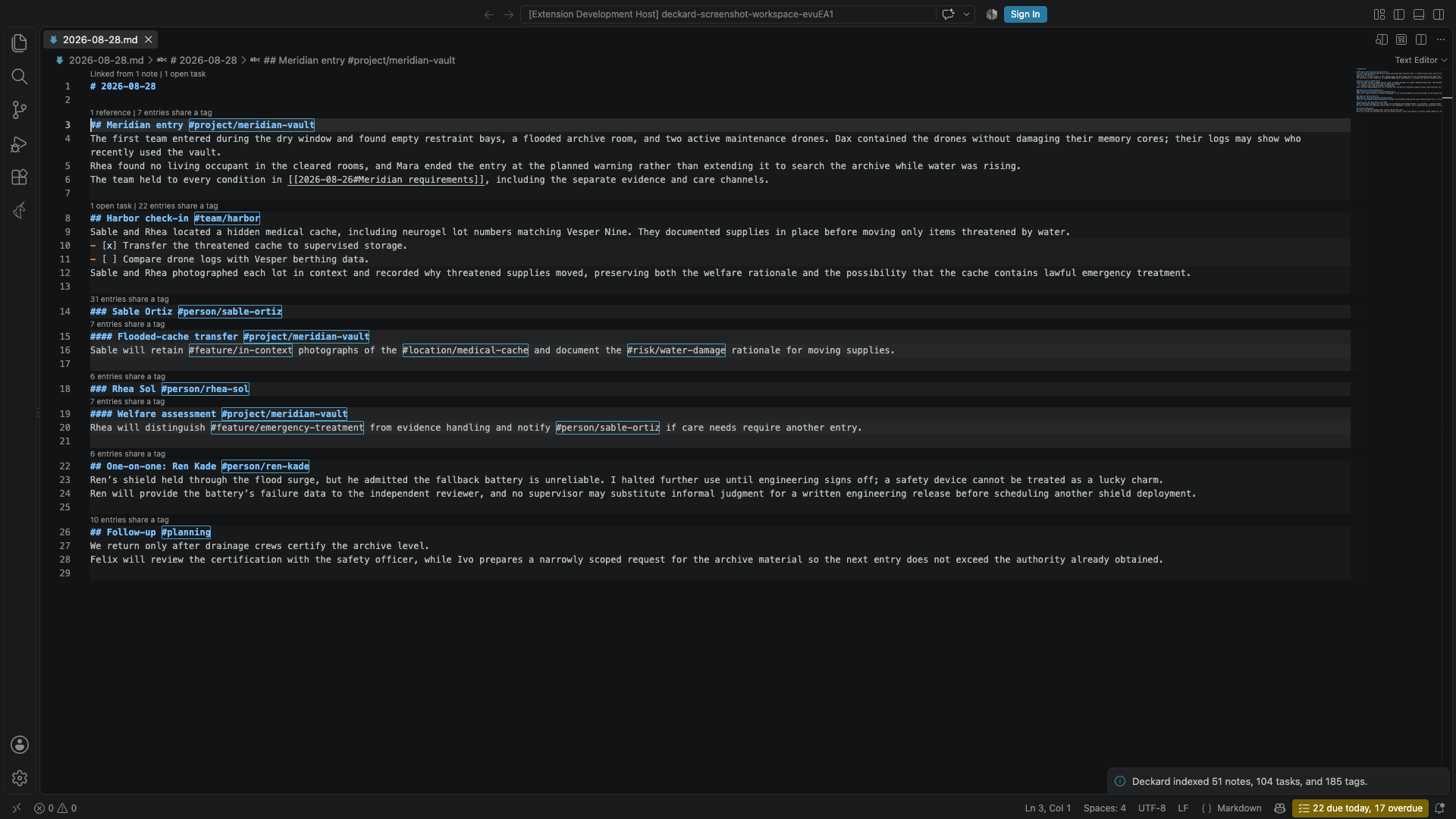
- Tags in Markdown editors receive clickable decorations. Cmd/Ctrl-click opens its page, and hovering a tag provides a separate clickable Rename action. Heading tags are always handled; tags on other lines follow
deckard.parseInlineTags. - Typing
#or@offers matching tags already in the index, with each tag’s current entry count.#atlcan complete to#project/atlas;@alcan complete to@alex-smith. Partial tag tokens are replaced correctly, fenced code is ignored except inside adeckardquery block, and numeric-only hash tags are excluded from#completion. - Typing
/after a space in a task offers due dates, priorities, repeat rules, and dependencies. See Typing metadata. - Inside
[[, notes are offered in the order Find ranks them: the words typed against each title, then how often and how lately you opened the note, with the notes you opened last first before anything is typed. After[[Note#, that note’s headings are offered, written as a link names them, with their tags taken out;[[#offers this note’s own, and[[##wordssearches the headings of every note. A day named in words, such as[[tomorrow,[[next fri, or[[oct 3, offers the link to that day’s note,[[2026-09-26]], with the day and how far off it is beside it. - Reference counts sit above a note’s lines. The first line says Linked from N notes when other notes link to it, and each heading shows N references for links that name it, such as
[[Launch plan#Decision]]or[[#Decision]], and N open tasks for the open tasks beneath it. Select a count to list those links or tasks in VS Code’s references peek. A tagged heading also shows N entries share a tag: the note sections, tasks, and front-matter-only notes elsewhere that carry one of the tags written on that heading. Tags inherited from a parent heading or the note’s front matter do not count, and neither do entries in the same note. Select it to open Related Notes focused on the heading, which lists those entries along with weaker matches such as associated tags and shared keywords. Setdeckard.editor.referenceCountstofalseto hide them. - Hovering a
[[Wiki link]]previews the note, or the section its#Headingnames, and says how many other notes link to it. A link to a note that does not exist yet, or to a name several notes share, says so instead. - Link problems are marked in open notes. A
[[link]]to a note that does not exist yet gets a Create note quick fix, which creates the note in your notes folder, and a name several notes share is a warning.deckard.editor.linkDiagnosticsturns this off. - A note with such links also says so on its first line: N links open no note lists them in the references peek, and Create N missing notes creates, in your notes folder, a note for each name no note has yet, leaving any note already there alone. A name several notes share is counted but not created, since another note would not settle which one it means.
deckard.editor.linkProblemsturns these off. - Task dependencies sit above a task that uses
⛔or🆔: Waiting on N open tasks for the tasks its⛔names that are still open, and Blocks N open tasks for the open tasks whose⛔names its🆔. Select either to list those tasks in the references peek. A⛔name no task carries, a typo or a task since deleted, reads No task has 🆔 name. A task with nothing still open on either side, and a done task, shows nothing.deckard.editor.taskDependenciesturns these off. - Daily notes carry ‹ 2026-09-21 and 2026-09-23 › on their first line, which open the daily notes before and after, skipping days without one; a side with no note has no arrow. Today’s note also offers Carry in N unfinished tasks while earlier daily notes still hold open tasks it does not, which runs Deckard: Roll Unfinished Tasks Forward. See Daily notes.
deckard.editor.dailyNoteActionsturns these off. - An embed the preview cannot draw says why above its line, as the preview does in its place: Embed: Atlas has no heading “Decision”, or Embed: Nothing in Atlas is marked ^choice. Select it to open the note the embed names, where the heading or marker was renamed or removed. An embed whose note name opens no note is left to the link problems above.
deckard.editor.embedProblemsturns these off. - Unlinked mentions are counted on a note’s first line: Mentioned in N notes without a link when other notes write its title, or one of its
aliases:, as plain text. Select it to list them in the references peek, or select Link N mentions to turn each into a[[link]], keeping the name as written —atlasbecomes[[atlas]], which opensAtlas.mdbecause links ignore letter case. The write is previewed and undone like Deckard’s other multi-note writes. Only whole words in prose count: not links, code, tags, Markdown links, headings, or front matter. Names shorter than three characters, and names another note also goes by, are not looked for.deckard.editor.unlinkedMentionsturns these off. - Hovering a tag shows how many notes and tasks use it, its hub note when it has one, and its five most recently updated entries, each a link to its line, with Open overview. Set
deckard.editor.hoverPreviewstofalseto turn previews off. The tag’s Rename action stays in the same hover.
Templates
Put Markdown files in a templates folder at the root of your workspace, or the folder deckard.templatesFolder names, and run Deckard: New Note from Template. Deckard asks which template to use and the new note’s title, then creates the note in your notes folder and opens it. Deckard never indexes the templates folder, so a template’s tags and tasks stay out of your notes.
Right-click a folder in the Explorer and choose Deckard → New Note from Template Here… to write the note into that folder instead; if Deckard does not index that folder, it says so. Deckard: Create Daily Note and Deckard: New Note from Template are also in File → New File… and on the Welcome page.
| Placeholder | Becomes |
|---|---|
{title} |
The title you enter, which is also the file name. |
{date} |
Today’s date, such as 2026-09-13. |
{time} |
The current time, such as 09:05. |
{ask:Question} |
Your answer when Deckard asks the question. A question used twice is asked once. |
Anything else in braces is left as written.
A template named after a tag namespace, such as person.md or project.md, starts every new hub note for a tag in that namespace. It can also use {tag}, and Deckard adds the describes: front matter unless the template writes its own.
← Getting started · All topics · Tasks →