Deckard guide
Home and Stats
Dashboard
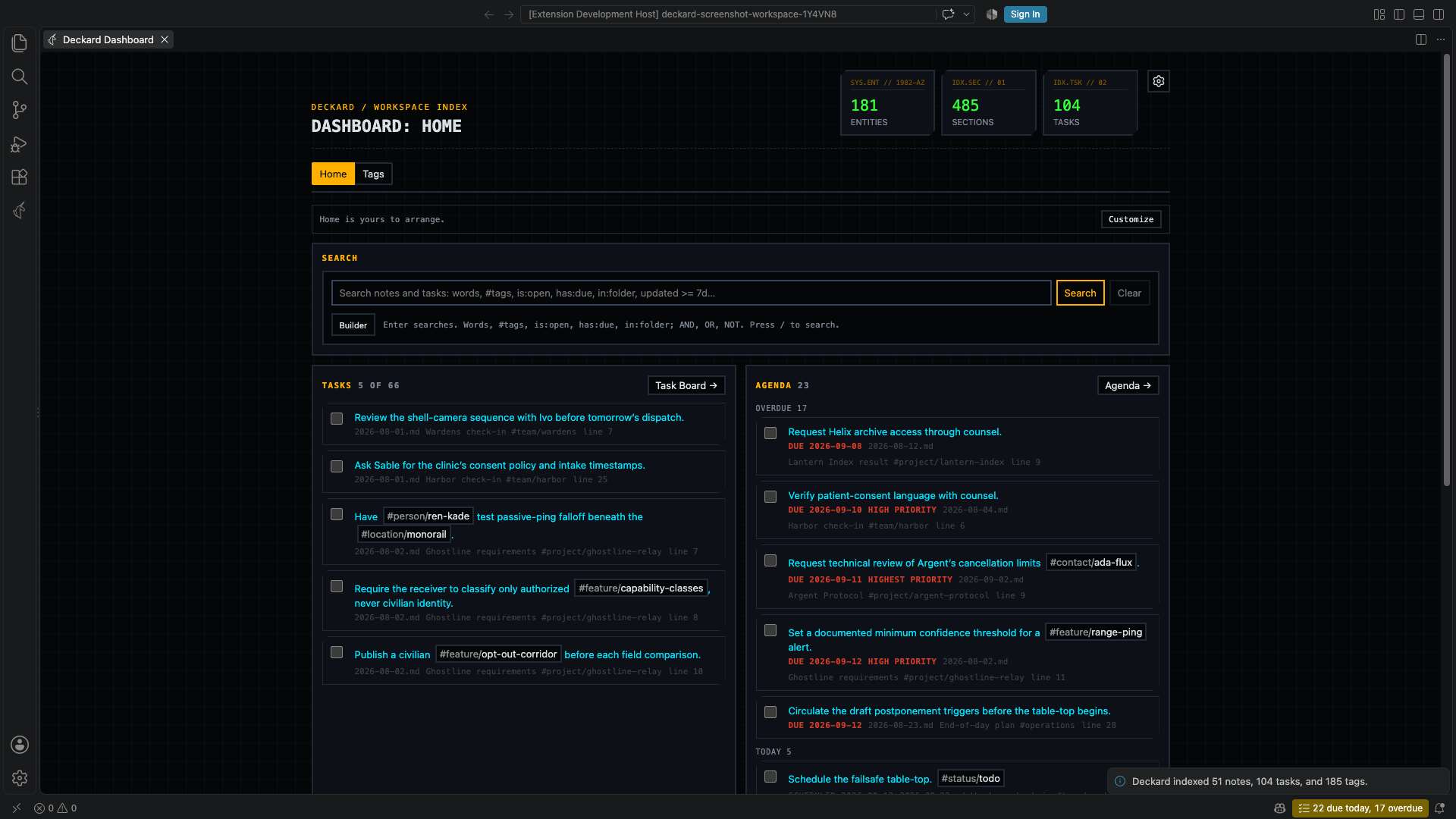
Run Deckard: Open Dashboard to see compact workspace totals and switch between the Home and Tags tabs. The Dashboard opens on Home; use Left/Right Arrow while the tab control is focused to switch tabs. The Dashboard’s tab and tag search are restored when you close and reopen it. Searches open search pages, and tasks have their own page, the Task board.
Home
Above Home, three figures say what wants doing: Overdue and Due today, as the Tasks view counts them, and Open, every open task. Each opens a search for what it counts, scoped by deckard.agenda.query when that is set, so the number and the page agree. The workspace’s totals of notes, tasks, and tags are on Stats.
What’s new. After an update that adds features, Home says Updated to Deckard 1.23. above its widgets, once, with What’s new, which opens Help’s list of the recent releases’ highlights, and Dismiss. It goes from every window’s Home once either is chosen. A patch says nothing, and there is never a pop-up. deckard.showWhatsNew turns the line off; Help’s What’s new lists the releases either way.
Home is made of widgets you choose; a new Home starts with Try next, the search box, the Tasks view, open tasks, favorite tags, and saved searches:
| Widget | Shows | Leads to |
|---|---|---|
| Try next | One suggestion, when your notes are ready for it: a weekly review after five daily notes, merging two tags that look alike, the Task board at ten open tasks, or pinning a note you open often. Not now puts it off for a week and Do not suggest this for good; running its command anywhere retires it too. With nothing to suggest it takes no space | What it suggests |
| Search | The search box; Enter opens a search page | The search page |
| Tasks | The first tasks a search finds, is:open unless you set another, ranked as on the Task board |
The Task board, on that search |
| Tasks view | Overdue, today’s, and upcoming tasks, as the Tasks view lists them, with a line under them saying how many were done today and how many need a new date, which opens them | The Tasks view |
| Favorite tags | The tags you favorited, with what searching for each finds | The Tags tab |
| Frequent tags | The tags you open most, lately | The Tags tab |
| Saved searches | Your saved searches, each removable | Where each was saved |
| Saved search results | What one saved search finds | Its search page, or the Task board |
| Recent searches | The searches you ran lately | Their search pages |
| Recently opened | The notes you opened from Deckard lately | The notes |
| Workspace | Note, file, task, tag, and entity totals | The Stats page |
| Today | Today’s daily note and its open tasks, or Create today’s note | Today’s note |
| Quick add | A field that adds an open task to today’s daily note, creating the note if needed | — |
| Stale tasks | Open tasks in notes left unchanged for 7, 14, 30, or 90 days, oldest first | The Task board |
| Related notes | Notes related to the note you had open last, ranked as Related Notes ranks them | That note |
| Tags written together | The tag pairs carried together by the most notes and tasks, counted as a search for both counts, with how much of the rarer tag’s entries they share; a pair searches for both | The Tags tab |
| Tags without a hub | Tags used at least three times with no hub note, each with Create hub | The Tags tab |
| New tags | Tags first seen in the last 7, 14, 30, or 90 days, newest first, each with Rename, so a typo is caught early | The Tags tab |
| Gone quiet | The people — or the projects, or any namespace you choose in its gear — you have not written about for 30, 60, 90, or 180 days, longest ago first, each with how long it has been and what is still open with them. Only those with no open tasks lists the stuck ones, each with Add next action, which asks for a task and captures it to today’s note with the tag | The Tags tab |
| Pinned notes | The notes you pinned, each with × to let go of it | The note, at the heading you pinned |
A tag is new from the first time Deckard indexes it; the tags in use when Deckard first kept track are not new.
Pinning happens where the note is, since a note in Deckard is an entry — a heading and what is written under it — and Home is the one place where the note being pinned is not in front of you. Three ways, all pinning the entry rather than the file:
Deckard: Pin Note to Homepins the entry the cursor is in, andDeckard: Unpin Note from Homelets it go.- Hovering a tagged entry in the editor offers Pin … to Home beside Show related notes for …, and Unpin once it is pinned.
- Right-clicking a result on a search page offers the same for that result.
Each says what it did with Undo beside it. A pin is kept as the heading’s text, its level, and which heading of that text it is, and is found again each time Home draws — so writing above a pinned heading, or promoting it, does not lose the pin. A heading that is gone leaves the pin on its note, saying the heading was not found, rather than disappearing. A note with no heading above the cursor, such as a front-matter-only note, is pinned whole, which is what pins were before they could name an entry: pins kept from earlier versions still point where they did.
Gone quiet watches people by default. Its gear’s Namespace chooses another, such as project, and a project’s open tasks include those under a heading that carries its tag. For people it reads @ tags and #person/… tags together, so one person written both ways is counted as the two tags they are — Stats says when that is what has happened. A name was last written on the day of the newest note carrying it, dated the way Deckard dates every note: a updated: field first, then a daily note’s day, then the file. Someone whose notes carry no date at all is left out rather than guessed at. Selecting a person opens their search page, where the entries themselves are.
Paging, in a widget’s gear, turns it from the first few entries into all of them a page at a time: the widget grows a line of its own with Per page, the entries it is showing, such as 6–10 of 601, and a chevron either way. The Agenda widget and a saved search’s results are not paged, because each lists more than one thing and a single page number could not say which. A widget’s page is kept with the rest of its settings, so Home opens where you left it.
Until Home has been arranged, a line above the widgets says it can be, with Customize and Dismiss beside it; once it has been arranged, or dismissed, the line is gone for good. Home’s widgets sit in three columns on a wide editor, two on most, and one on a narrow panel. Choose Customize in the View options gear to arrange Home. Drag a widget to move it, or right-click it to move it first or last; switch it between half and full width; open its own gear to choose how many entries it lists, whether it pages through the rest, which search a tasks widget runs, which saved search a results widget shows, or how many days Stale tasks, New tags, and Gone quiet look back, and which namespace Gone quiet watches; remove it with ×; and add more from + Add widget. Reset restores the widgets Home started with, and Done finishes. Widgets side by side share their row’s height. Home’s arrangement is kept in VS Code’s preferences, never in your notes.
Tags
- Tags shows namespaced and unnamespaced tags together. Search tags, narrow them to one namespace, or to tags without one, with Namespace, where a person’s
@tag counts as Person, then sort alphabetically, by entry count, by most accessed, or by custom rank. Favorite important items; in Rank mode, drag a row or use its context menu to move it to the top or bottom. Wherever a namespaced tag is shown inline, its#namespace/prefix is muted while the tag value keeps the surrounding view’s normal color. - Searches are kept between visits. When a search is narrowing the Tags list, a line above the list says so, such as Showing 3 of 42 tags matching “vendor”, with Clear search, and the search box is outlined. A Namespace filter counts too, such as Showing 12 of 90 tags, in Person, and Clear search clears it along with the text. A dot on the Tags tab marks it while a search is narrowing it.
- Saved searches are listed below the tags. Select one to reopen it where it was saved, or use Remove to delete it.
- Use the View options gear to choose one through four tag columns.
- Select a tag to open its page.
- Right-click any tag or entity row, or press Shift+F10 or the menu key on it, to choose Rename tag. Every right-click menu in Deckard opens from the keyboard the same way. When tags use custom rank, drag rows or right-click a row to move it to the top or bottom. Display order changes do not reorder text in your Markdown files.
Stats
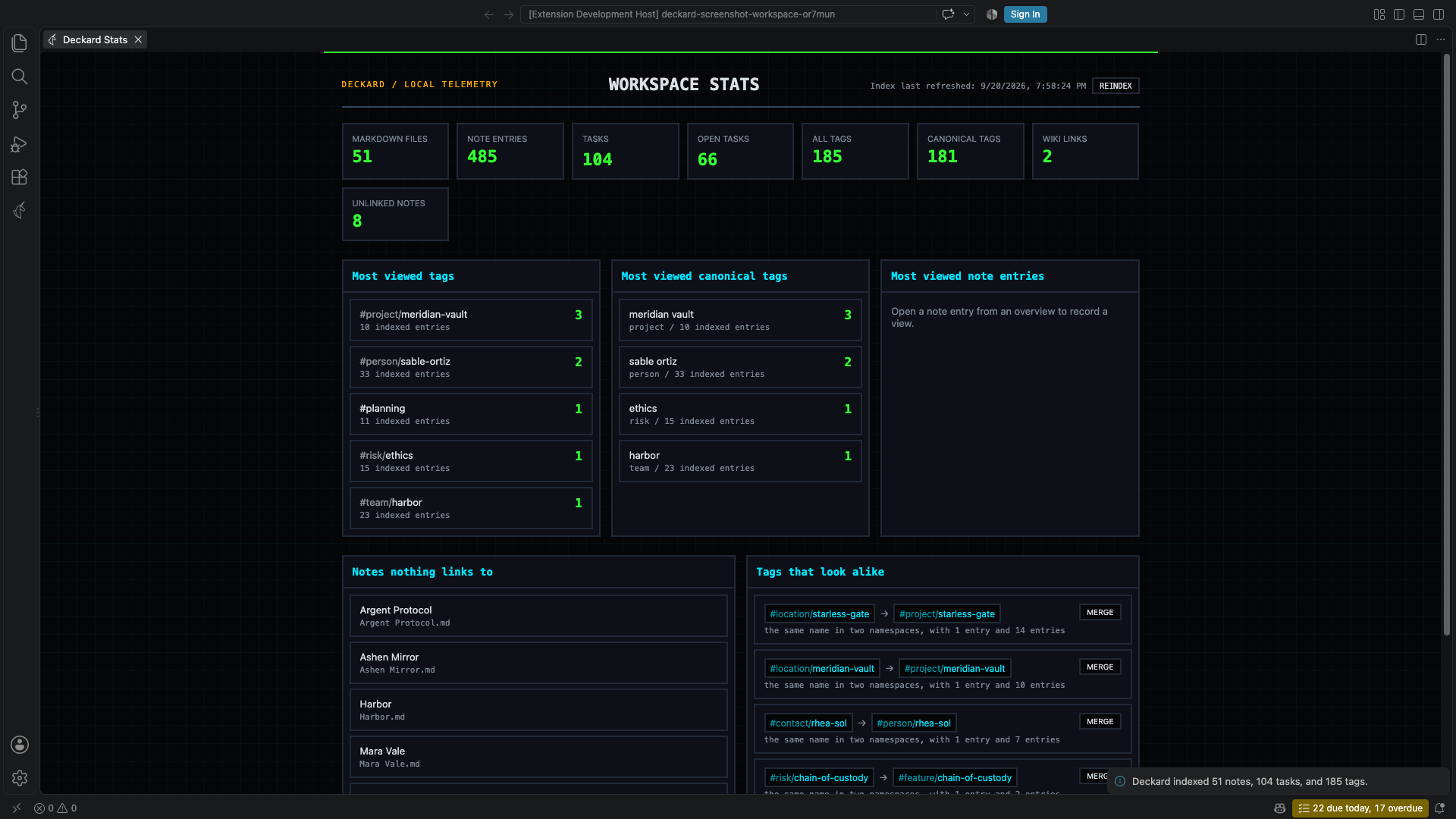
Run Deckard: Open Stats to see what needs attention in the workspace, then its totals, then what you open most. Deckard counts the same things under the same names everywhere: a note is a headed entry, and a file holds one or more of them.
Needs attention comes first and holds only the lists that have something in them, each heading saying how many: Notes Deckard could not read, Links that open no note, Tags that look alike, and Notes nothing links to. With none of them, one line says the workspace is in order. Links that open no note lists every name a [[link]] writes that no note carries, most linked first, with how many links write it and from which notes; select one to search for those links, Create makes that note, empty, in the notes folder, and Create all makes every one after asking. A name two notes share is not listed: the editor warns about it where it is written. Notes nothing links to leaves out daily, weekly, and monthly notes, which are found by their date, and parked notes, which are expected to sit unlinked; it shows ten, with Show 40 more for the rest of the fifty listed, and select one to open it.
Every total but Files opens what it counts: Notes, Tasks, and Open tasks open a search for them (is:note, is:task, is:open); Tags and Namespaced tags offer their tags, most used first, and open the one you choose; Wiki links opens the Notes Graph with Only links I wrote on; and Unlinked notes moves to the list of notes nothing links to. Under Notes, Tasks, and Open tasks, a line draws the last twelve weeks, a point for each rolling seven days ending today, and says how the total moved: +9 in the last 7 days. Hover a point for its value. The weeks are rebuilt from today’s notes, by the date each note was written, and a task stops being open on its ✅ date, or its note’s last change when it has none: an entry added to an old note counts from that note’s date, and a deleted note is gone from past weeks too. When anything is parked, a line under the totals says how much, such as Parked: 312 notes, 41 open tasks, and opens the is:parked search.
Most viewed lists the tags, namespaced entities, and note entries you open most, from Deckard’s local access counters. These counters are collected when you open a tag’s page or select a note entry on a search page, and are stored only in VS Code preferences. A list with nothing in it folds into one line naming what has no views yet. Select a most-viewed tag or canonical tag to open its page, or a note entry to open its note at that line.
How often tags are used draws six bars — used once, twice, 3–5, 6–10, 11–25, and 26 or more times — each saying how many tags it holds, such as Used once: 41 tags. Used once unfolds those tags, the likeliest typos and one-offs, each with the tag it looks like and Merge, or Merge into…, which asks for the tag to keep. Any other bar offers its tags to open.
Tags written together pairs your twelve most-used tags in a triangle: each cell counts the notes and tasks carrying both, as a search for both finds them, with a swatch shaded by how often, and opens that search (#project/atlas #design). The arrow keys move between cells. Show as a table lists the same pairs by count instead, which is also what a narrow panel shows.
If a note in the workspace could not be read — a permissions error, an encoding Deckard cannot decode — it is not in the index, and no search finds it. Deckard says so the moment it happens, once per note, and Stats lists every such note with the reason, so a search that comes back short does not just look like a bad search. Select one to open it; fix the cause, then reindex.
Tags that look alike
Stats lists pairs of tags that look like one idea spelled twice, clearest first, each pointing from the rarer spelling to the one your notes already use. Merge on a row merges them through the usual merge: the same confirmation, the same preview, and the same Undo. Select either tag to open its search page and read the entries first.
A tag’s own page says the same, under its hub: Also written as #proj/atlas (6 entries). for up to three other spellings, with Include in search, which searches both, and Merge, which runs the same merge and, when this page’s tag is the one merged away, reopens on the tag kept.
| A pair reads | Because |
|---|---|
@ren-kade → #person/ren-kade |
the same name written two ways |
#org/acme → #organization/acme |
the same name in two namespaces |
#vendorrisk → #vendor-risk |
the same name punctuated two ways |
#topic/reports → #topic/report |
one is the plural of the other |
#project/atals → #project/atlas |
one or two letters apart, counting two letters written the wrong way round as one |
Spelling pairs are only ever compared inside one namespace, so #project/relay and #risk/relay are not a pair, and neither are two tags that merely sit in the same namespace. Setting deckard.entityNamespaceAliases is the other way to settle a namespace pair: it collapses one namespace into another for good, without touching your notes.
← Query blocks · All topics · Related notes, the graph, and the outline →