Deckard guide
Search
Deckard has one search language everywhere: Deckard: Find in Notes for getting to something quickly, and the search box on search pages, Home, and the Task board for seeing everything a search finds.
Find
Run Deckard: Find in Notes, or press Cmd+Shift+Alt+F (Ctrl+Shift+Alt+F on Windows and Linux), and start typing. Results appear as you type.
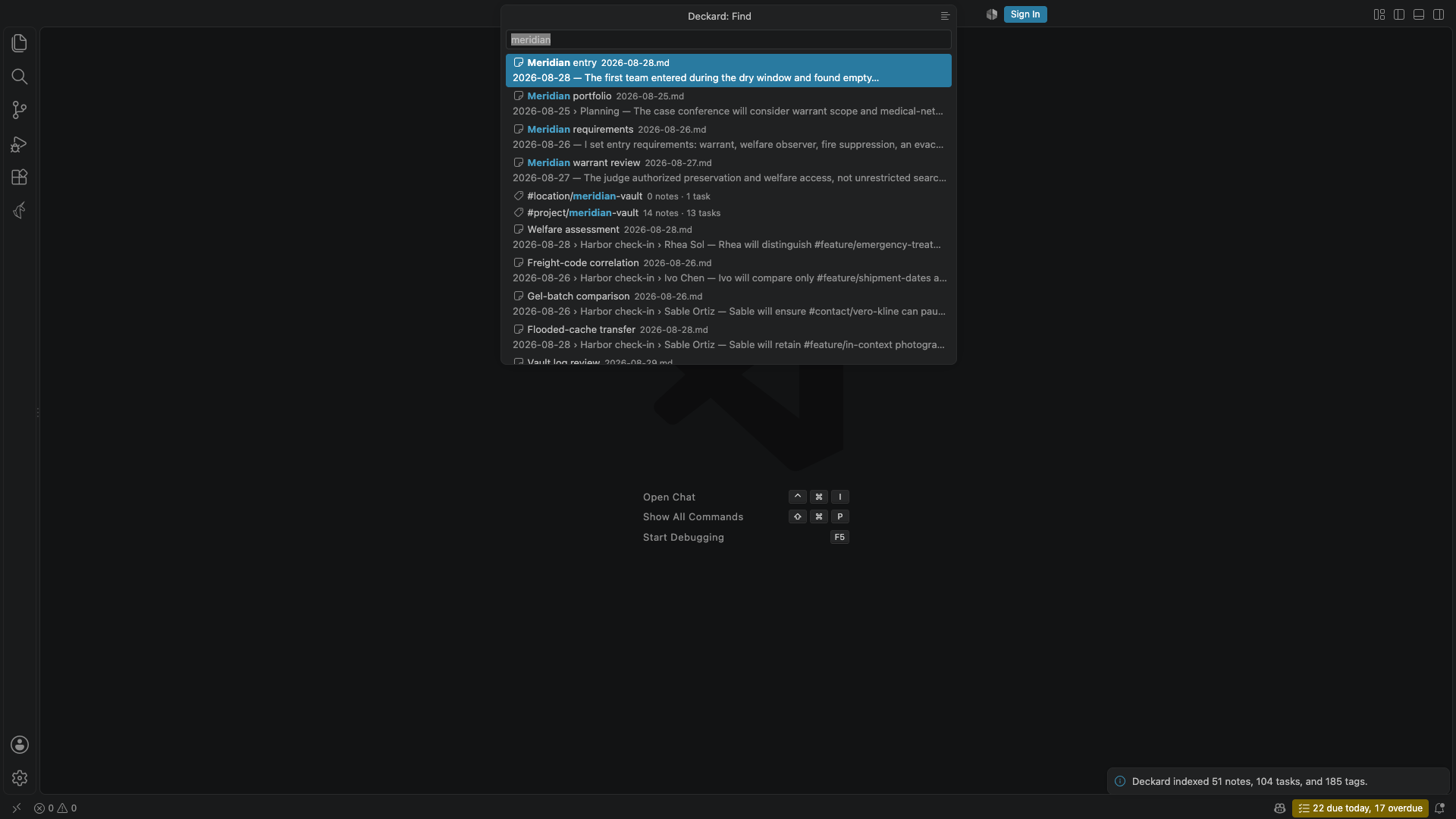
- Plain words are searched in every note section, task, and front-matter-only note. An entry titled with your words comes first, then titles that contain every word or match them loosely, such as
vconfor Vendor contract, then entries whose text mentions them, ranked by relevance. The last word matches while you are still typing it. #tags,@people, and the rest of the query language, such asis:openorin:notes/work, narrow the results exactly as they would anywhere else.- A word also finds tags by their last part, so
atlasoffers#project/atlas, and a value finds its condition, sooverdoffersis:overdue. Tab completes the highlighted tag or condition into the search, as does the + button beside a tag. - Enter opens the note or task at its line, a tag’s page, or a saved search. Show all results, or the list button in the title bar, opens the search on a search page.
- When no note has every word, Find says so and shows the notes with some of them. A misspelled word gets a Search for … instead row with the closest word your notes contain.
- With nothing typed, Find lists your pinned notes, the five notes you opened last, your five recent searches, your saved searches, and your favorite and recently opened tags. A recent search has a Save search button.
- A note or task found has a button to open it to the side, which leaves Find open for the next, and a note has one to insert a link to it, at its heading, where the cursor was when Find opened. The keys do the same: Cmd+Enter opens the highlighted result beside the editor and keeps Find open, and Alt+Enter inserts a link to it (for a task, to the heading it is under). Cmd+. lists everything the highlighted row can do — open it, link it, copy a link, pin it; complete, reopen, date, or edit a task; favorite or rename a tag; save or forget a recent search — each with its key. On Windows and Linux, Ctrl for Cmd. Each button’s tooltip names its key.
- A task row has Complete (or Reopen) and Set due. Completing it keeps Find open and redraws the row in place, with the usual message and Undo; Set due offers Today, Tomorrow, Next Monday, a date, or none, then comes back to Find with the same search.
- Words that no note is called, and that read as a name rather than a search, offer Create note “…”, which creates it in your notes folder.
- Opened with a few words selected on one line, Find starts with them as its search, all selected, so typing replaces them.
- When no entry has every word you typed, and what you typed is only words, tags, and people, Find also offers Capture “…” to today’s note, with the line it will write under it, read exactly as Quick capture reads it:
Call Ren friday p2becomes- [ ] Call Ren ⏫ 📅 2026-10-02. Enter adds it and says so, with Open. - When what you type is a day, such as
friday,oct 3, orlast friday, Find offers to open that day’s note first, and creates it when there is none, in place of Create note. A short weekday alone, such asfri, is searched for as a word.
Ties are broken by how often and how recently you opened something, so a note you opened yesterday comes before one you opened often last year. A note counts as opened when it stays in the editor for a moment, however it was opened — from the Explorer, Quick Open, or a link as much as from Deckard — once for the heading the cursor is in, and again only after ten minutes. A heading keeps its count when lines above it change. Find also remembers which result you chose for what you typed, and offers it higher the next time you type the start of it, though never above a note titled exactly what you typed; an old choice counts for less. This is kept in VS Code’s preferences, beside the access counts, and never in your notes.
The search box
Search pages, Home’s search widget, and the Task board have the same search box. Press / anywhere on the page to type in it. The line under the box that lists what a search can say shows while the box has focus or holds a term, and rests the rest of the time; Builder stays beside it. The Task board’s box searches tasks alone.
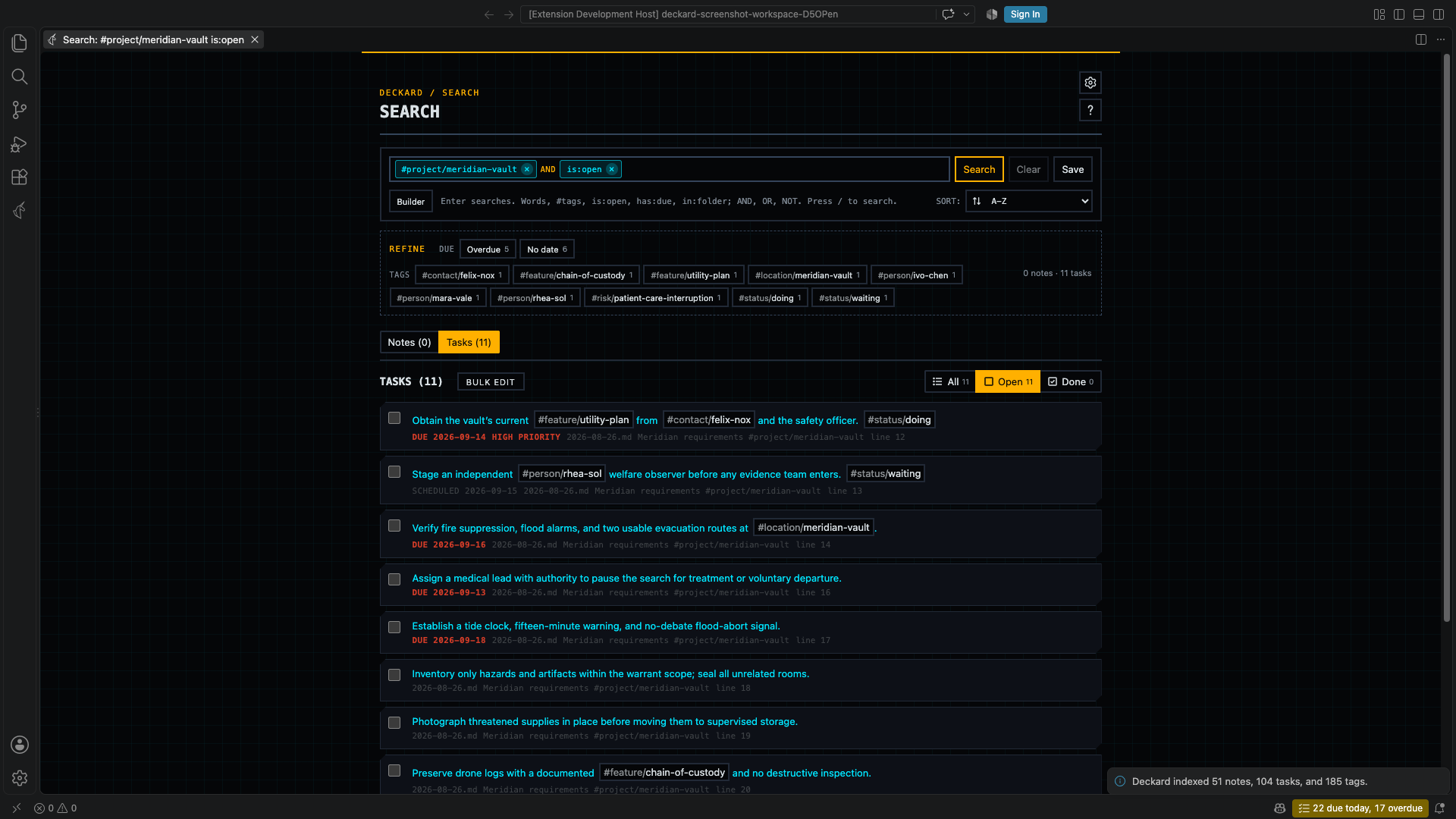
- The box is a field of chips, as a multi-select is. Each term of the search, whether a tag, a condition such as
is:open, or words, which show as thetext ~condition they run, is a chip with a ×, joined to the next by AND or OR. A parenthesized group is a frame of its own chips with a × of its own at the end, nested as deep as the search goes, so a condition inside a group can be removed alone and the group removed whole, just as the builder shows it. Tags are drawn in blue, and anything turned around withNOTor-in red. Type the next term in the field after the chips. - Plain words narrow the search as you type, across everything it found rather than the page of it on screen, so a match on the last page is found from the first. The counts, the pages, and Refine all follow. Enter adds the words to the search itself, which makes them chips, remembers the search, and lets you save it; until then they are a draft, and leaving the box lets them go.
- Completions appear as you type: field names, the values a field accepts once the caret is in one, tags, whole conditions such as
is:open, and, in an empty box, your recent searches. After[[they are your notes, most linked first, each saying how many notes link to it, with aliases named as aliases; a new builder row takes[[the same way. Nothing is preselected, so Enter always runs what you typed; Tab completes, arrow keys move through the list, and Escape abandons the edit. - Choosing a tag, a condition, or a field’s value from the completions makes it a chip at once. Pressing a chip removes its term and keeps the rest as you wrote it, and Backspace in an empty field removes the last chip.
- Text you typed and did not add is let go when the box loses focus, unless you move to its own buttons, such as Search.
- AND, OR, and NOT are drawn in their own color. Two tags written side by side are joined with AND, and Refine adds its values with AND.
- On a tag’s page the box holds the tag as a chip, so everything the page filters by is in one place.
- A parse error is reported under the box; the chips and results keep the last search that ran, and the field keeps what you typed so you can fix it.
- A search page that finds nothing offers a closer spelling, as Find does: Nothing matched. Search for … instead? replaces each misspelled word with the closest word your notes contain and leaves the rest of the search as you wrote it, so a tag or a folder is never corrected into something else. It is offered only when the corrected search finds something.
- Save, beside the box, stores the search under a name. Saved searches appear on Home and the Tags tab, reopen where they were saved, and survive tags being renamed or removed from the index.
Builder, under the search box, edits the same search as rows and groups, nested as deep as the search goes. Every group says whether it matches all of its rows or any of them, and not turns a group around, so anything the search box can say, the builder can build: three tags allowed and one left out — what Refine makes with three clicks and an Alt — is one group matching any of three rows, beside a row for the tag left out. Add condition starts a row from its value: type a tag, a word, or a value such as open, and choose a completion or press Enter, and the row fills in its field and operator. Enter then opens the next row, Backspace in an empty row removes it, and Ctrl+Enter (Cmd+Enter on macOS) adds a group beside the row, joined the other way. A finished row keeps its field, operator, and value dropdowns for editing. The operator list shows the operators themselves — =, !=, ~, !~, >, >=, <, <= — with their meaning on hover, so there is no separate negate control to disagree with a row, and a hand-written NOT tag = #a opens in the builder as tag != #a. The search box remains the source of truth: a nested group is written back with its parentheses, and a negated one as NOT (…).
Refine
Under the search box, Refine counts what the results could still be narrowed by: open and done tasks, due dates (overdue, the next seven days, later, or none), the tags the results carry, the notes they link to (Links to, up to eight, most linked first), when notes were last updated, the month they were created (this month, last month, the two before by name, and earlier), and the folders they are in. Each value shows how many of the current results it keeps, and a value that would keep all of them, or none, is not offered.
- Select a value to add it to the search with AND, keeping only the results that match it.
- Alt-select it to add it with AND NOT, leaving those results out.
- Shift-select it to add it with OR, widening the value chosen before it so either matches — open or done tasks, say.
- Hovering a value says which of the three a click, Alt-click, and Shift-click writes, in the words of the query itself. From the keyboard, Enter, Alt+Enter, and Shift+Enter on a focused value do the same.
Every value adds ordinary query text, so a refined search can be saved, copied into a query block, or edited in the builder. A search of one tag, or of several tags joined by AND, lists related Tags instead of counting the tags the results carry, since associations are ranked better than a count can be: those on the most results first, with a three-step rail filled by the share of the results each is on (its tip and screen reader label say in 6 of 13 results), and kept even when every result carries them, since they still say how the tags relate. While the Related Notes sidebar is open beside the page, Refine is shown there.
Query language
A Deckard query is what you type into Find, the search box, a query block, or an AI assistant:
(tag = #project/atlas AND tag = @ren-kade) OR (tag = #risk/vendor AND text ~ "elevator")
Terms combine with AND, OR, NOT, and parentheses. AND binds tighter than OR, adjacent terms are joined by an implicit AND, and - or ! in front of a term negates it. A bare #tag or @person is a tag condition, a bare [[Note]] is a link condition, and a bare or quoted word is a text condition, so #project/atlas "vendor risk" is a complete query.
Common filters have one-token shorthands, written the way GitHub writes them:
| Shorthand | Finds |
|---|---|
is:open, is:done |
Open or completed tasks. |
is:overdue |
Open tasks past their due date, however long ago. |
is:today |
Open tasks due today, or scheduled for today or earlier and started: the Tasks view’s Today. |
is:needs-date |
Open tasks more than deckard.tasks.needsNewDateAfterDays (30) days past their due date: the Tasks view’s Needs a new date. |
is:due |
Open tasks due within the next seven days, overdue ones included. |
is:task, is:note |
Every task, or note sections without tasks. |
is:blocked, is:blocking |
Open tasks waiting for a task that is still open, and the open tasks they wait for. |
is:waiting |
Open tasks you are waiting on someone for: marked #status/waiting, or assigned with 👤 to someone other than you. With deckard.me empty, every assigned task counts. |
is:available |
Open tasks you can start now: not blocked, started (no 🛫 date, or one today or earlier), and without a status in deckard.tasks.onHoldStatuses (waiting and someday). |
is:mine |
Tasks for the person deckard.me names, and tasks for nobody in particular. Without that setting, only the latter. |
is:assigned, is:unassigned |
Tasks that name a person, and tasks that name nobody. |
has:due, no:due |
Tasks with, or without, a due date. scheduled, start, done, priority, id, and dependsOn work the same way. |
in:notes/work |
Everything in a folder and the folders inside it. * and ? are wildcards. |
is:daily |
Anything written in a daily note — one named for a day, such as 2026-09-25.md, or with a day in its top heading — tasks included. is:journal is the same. |
is:periodic |
The same, and weekly and monthly notes too. is:dated is the same. |
is:parked |
Notes, entries, and tasks that are parked: in a folder deckard.parked.folders names, or found by a search for a tag deckard.parked.tags names. |
is:step, has:steps, no:steps |
A task’s steps: checkboxes written under another task. has:steps finds tasks broken into steps, no:steps tasks with none. -is:step leaves steps out. |
Put - in front of a shorthand to negate it, as in -is:done. Deckard keeps a shorthand as you wrote it when it saves or formats a query.
is:blocked and is:blocking read the ⛔ and 🆔 markers as the edges between two open tasks: a task is blocked while a task it names in ⛔ is still open, and blocking while an open task names its 🆔. Completing the blocker frees both, so neither lists a task whose other end is done, and a ⛔ naming nothing in the workspace blocks nothing. has:dependsOn and has:id read the markers themselves whatever state the tasks are in.
The fields:
| Field | Matches | Example |
|---|---|---|
tag |
A tag, including tags a section inherits from a parent heading and tags a note carries in its front matter. * and ? are wildcards. |
tag = #project/atlas, tag = #risk/* |
link |
The entries that link to a note, by its name or any aliases: name. [[Atlas#Decision]] narrows to links to that heading, [[Atlas#^q3]] to that marked line, and the text after \| is ignored. Only = and !=; the brackets are optional after link. |
[[Atlas]], link = [[Atlas#Decision]], -[[Atlas]] |
text |
Words in a note body, a task line, or a front-matter-only file. : and ~ match a substring; = and != match a whole word. |
text ~ elevator, text = plan |
task |
open, done, or any. Only tasks can satisfy it, so a query using it returns no notes. |
task = open |
due, scheduled, start |
A task’s 📅, ⏳, or 🛫 date: a date, today, tomorrow, a weekday such as friday (the next one), any other day in plain words quoted or with - for its spaces, a whole week or month (this-week, next-week, this-month, next-month, 2026-10), a window such as 7d counted forward from today, or none for a task without that date. Only tasks can satisfy them. |
due < today, due <= friday, due <= "oct 3", due = this-week, due = none |
done |
A task’s ✅ date, with windows counted back from today and a weekday meaning the last one. | done = 7d, done >= "last friday" |
priority |
highest, high, medium, none, low, or lowest. A task without a priority counts as none, which ranks between medium and low. |
priority >= high |
assignee |
The person a task is for: whoever its 👤 field names, or none for a task that carries none. @ren-kade, #person/ren-kade, and ren-kade all name the same person. Only tasks can satisfy it. |
assignee = @ren-kade |
kind |
An entity namespace, including person for @ tags. |
kind = project |
file |
A file name, with * and ? wildcards. |
file = 2026-09-*.md |
path |
A workspace-relative path, with wildcards. | path = notes/* |
created, updated |
A date such as 2026-09-13, a window such as 30d, today, a weekday such as friday (the last one), a whole week or month (this-week, last-week, this-month, last-month, or 2026-08). A bare date means that whole day. |
updated > 7d, created = 2026-09-13, created = last-month |
A link belongs to the entry whose own lines hold it, as a tag written there would: the task on its line, the tagged line it sits in, or else the heading it is written under (not that heading’s parents). A link in front matter or above a note’s first heading answers for the note itself, which the search lists with the text above its first heading. Links count wherever Linked from counts them: front matter included, code blocks left out, and a note’s links to itself left out unless they name one of its headings. A link to a note that does not exist yet still counts, so [[Q4 offsite]] finds everything waiting on that note. A search that held [[…]] before this release searched for the words inside it; it now searches for the link.
A week or a month is the whole span: due = this-week is any day of this week, due < next-week is before next week starts, and created >= last-month is from the 1st of last month on. A week starts on the day deckard.calendar.weekStart names, Sunday unless you change it. friday is one day, the next one for due, scheduled, and start, and the last one for created, updated, and done. Values are read when the search runs, so a saved search or query block of this-week moves on with the week. A numeric date such as 10/3 is not read in a search, since it would mean a different day on another machine.
A note’s created date is its created: or date: front matter. Without either, a daily note counts as created on its day, or earlier if its file is older, and any other note on its file’s creation time. Its updated date is its updated: front matter, or its file’s modified time. A git clone resets every file’s times, so the dates a note states come first.
Operators are = for is, != for is not, ~ for contains, !~ for does not contain, and >, >=, <, <= for dates and priorities. A window such as 7d is compared by its far end: updated > 7d means updated within the last seven days, and due < 7d means due within the next seven days, overdue tasks included. : is accepted everywhere = is, so queries written with tag:#atlas keep working, but Deckard writes = when it formats a query back. A comparison can follow the operator, so updated:>2026-01-01 and updated > 2026-01-01 mean the same thing. Every operator has an opposite, so any single condition can be negated without NOT; NOT is for negating a whole parenthesized group.
While a search page is the active editor, the Related Notes sidebar shows that search’s Refine options in place of related notes, headed by the search’s own title, and returns to related notes when a Markdown note is active again. A search naming exactly one tag keeps that tag’s association suggestions.
← Task board · All topics · Search pages and tag overviews →